Sawmill shows you your statistics in a variety of ways
Sawmill can show you statistics data in a number of
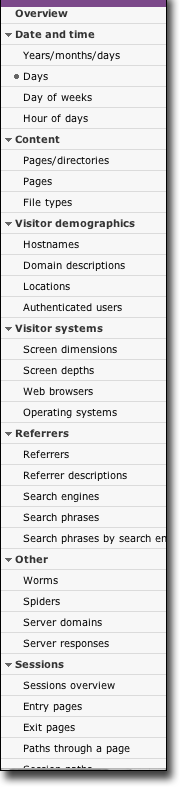
different ways. Every statistics page has a list of buttons down the
left, like the one you see at the right on this page. Clicking a
view name shows you the data in that way.
Views are different ways of looking at the same set of hits; they
all show the same traffic, but they show different aspects of the
traffic. For instance, one view can show you which pages were hit
most, or which directories. Others can show you which domains
brought the most traffic, or which referrers (advertisements, search
engines, and links on other sites) brought the most hits. They can
show you who logged in, what web browser or operating systems they
used, when they visited, what what they searched for in the search
engine that brought them. It can show you which pages they entered
at, which pages they left from, and all the pages in between.
It is important to realize that though Sawmill only has a few
dozen views, that does not mean that it can only generate a
few dozen reports. Sawmill can generate an almost infinite number of
different reports, because the view is not the only thing that
determines what shows up in the report. Equally important are the
Filters, which you can set however you want to limit which data you
see. For instance, you can set a filter so you see only data in
January, or you can set one so you only see hits on a particular
directory, or both. There are almost infinite possibilities with the
filters, and for each possible filter, you can see all the views.
For instance, if your filters are set to show hits on January, you
can click "Top days" to see the top days in January, or you can
click "Top operating systems" to see which operating systems were
used in January. Most tools can only show you a few dozen reports —
Sawmill can show you trillions.